> ## Documentation Index
> Fetch the complete documentation index at: https://docs.magicblock.gg/llms.txt
> Use this file to discover all available pages before exploring further.
# Magic Router
> MagicBlock の Magic Router が、適切な実行環境へルーティングすることで取引をどう高速化するかを学びましょう。
VIDEO
***
## 動的トランザクションルーティング
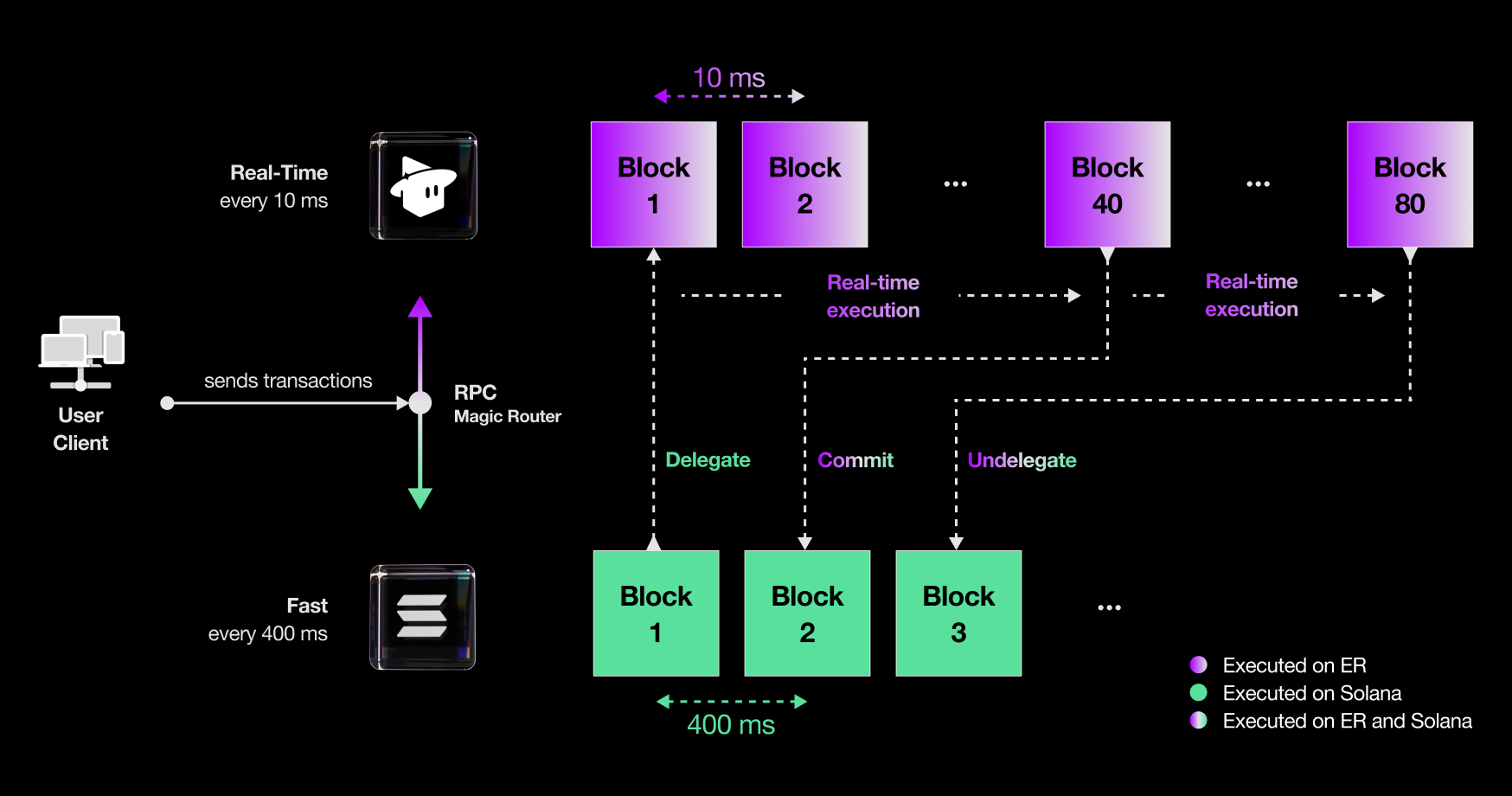
**MagicBlock の Magic Router** は、トランザクションメタデータに基づいて、**Ephemeral Rollups** と **Solana** のどちらで実行すべきかを賢く判断する動的トランザクションルーティングエンジンです。
これにより、開発者は手動でルーティングロジックを書く必要がなくなり、取引速度と開発体験の両方が大きく向上します。
* ✅ **単一エンドポイントで簡単統合**:1 つの RPC エンドポイントに接続するだけ
* ✅ **シームレスなウォレット体験**:接続、署名、送信だけでよく、裏側を意識する必要はありません
* ✅ **より速い確認**:Magic Router が最速の利用可能エンドポイントへルーティングします
Anchor プログラムと統合する
Native Rust プログラムと統合する
Magic Router API を試す
***
## コードスニペット
動的にトランザクションを送る前に、まず Magic Router との接続を初期化します。
これらの公開 RPC エンドポイントは現在無料で、開発用途に利用できます:
初期化、送信、確認に使う好みの SDK を選んでください。
* `ephemeral-rollups-kit` は `@solana/kit` 向け
* `ephemeral-rollups-sdk` は `@solana/web.js` 向け
```typescript Kit theme={null}
import { Connection } from "@magicblock-labs/ephemeral-rollups-kit";
// Initialize connection
const connection = await Connection.create(
"https://devnet-router.magicblock.app",
"wss://devnet-router.magicblock.app"
);
// ... create transaction
// Send and confirm transaction
const txHash = await connection.sendAndConfirmTransaction(
transactionMessage,
[userKeypair],
{ commitment: "confirmed", skipPreflight: true }
);
```
```typescript Web3.js theme={null}
import { sendAndConfirmTransaction } from "@solana/web3.js";
import { ConnectionMagicRouter } from "@magicblock-labs/ephemeral-rollups-sdk";
// Initialize connection
const connection = new ConnectionMagicRouter(
"https://devnet-router.magicblock.app/",
{ wsEndpoint: "wss://devnet-router.magicblock.app/" }
);
// ... create transaction
// Send and confirm transaction
const txHash = await sendAndConfirmTransaction(connection, tx, [payer], {
skipPreflight: true,
commitment: "confirmed",
});
```
Magic Router は各トランザクションのメタデータ(writable accounts、owner、signer など)を解析し、最適な専用エンドポイントへ自動ルーティングします。
 ***
## クイックアクセス
***
## クイックアクセス
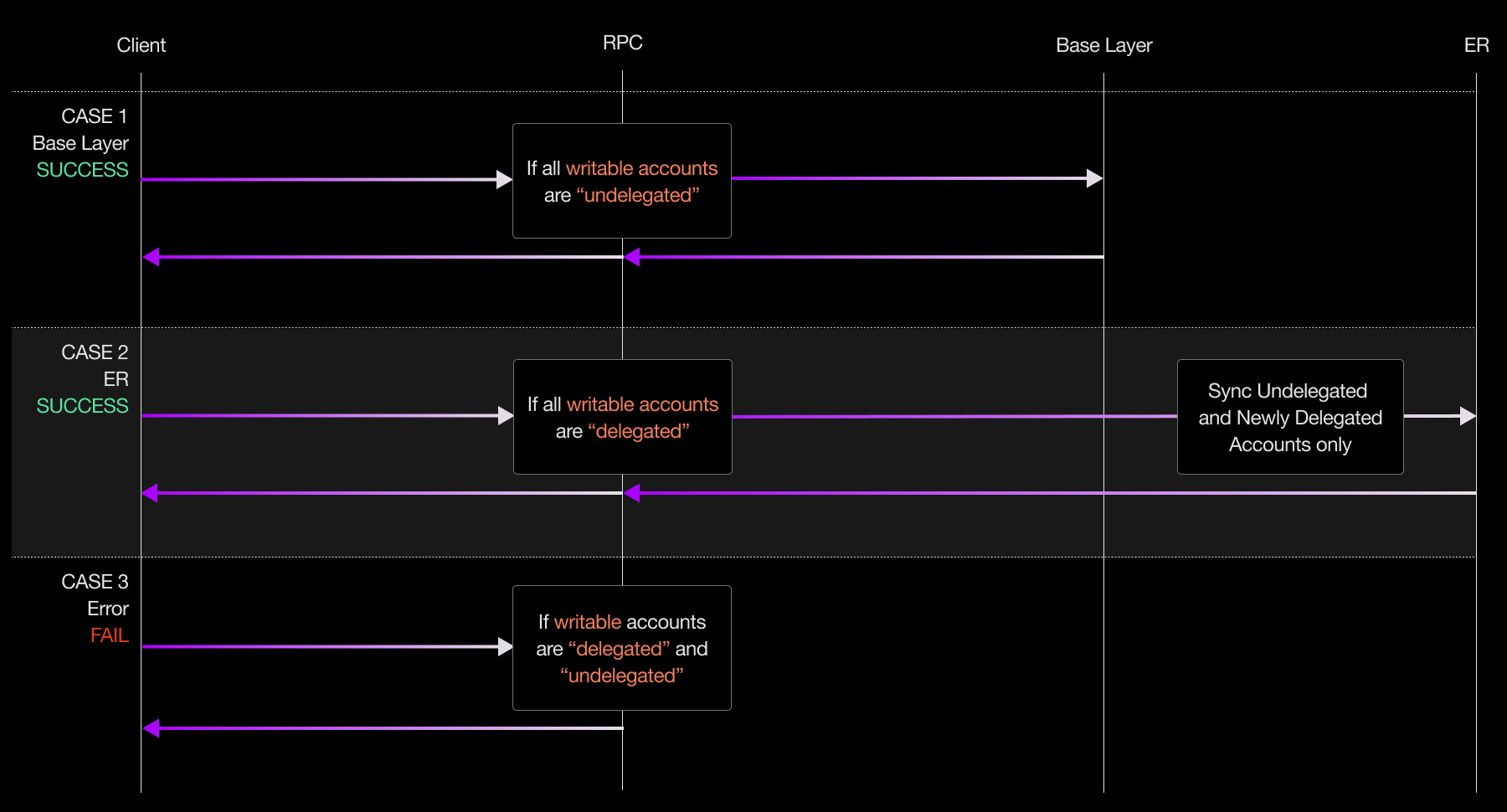 1. **クライアント - トランザクション送信** dApp またはユーザーが Magic Router RPC エンドポイントへトランザクションを送信します。
2. **RPC - メタデータ検査**
Magic Router はトランザクションメタデータを調べ、writable accounts の owner を確認します。
3. **Validator - スマートルーティングと実行**
メタデータに基づいて、ルーターは次のどちらへ送るかを判断します。
* **Ephemeral Rollup**:高速・低レイテンシ・ゼロコスト実行向け
* **Solana**:永続的で高スループットな実行向け
***
1. **クライアント - トランザクション送信** dApp またはユーザーが Magic Router RPC エンドポイントへトランザクションを送信します。
2. **RPC - メタデータ検査**
Magic Router はトランザクションメタデータを調べ、writable accounts の owner を確認します。
3. **Validator - スマートルーティングと実行**
メタデータに基づいて、ルーターは次のどちらへ送るかを判断します。
* **Ephemeral Rollup**:高速・低レイテンシ・ゼロコスト実行向け
* **Solana**:永続的で高スループットな実行向け
***