> ## Documentation Index
> Fetch the complete documentation index at: https://docs.magicblock.gg/llms.txt
> Use this file to discover all available pages before exploring further.
# Installation
## Unity
Go [here](https://unity.com/download) to install Unity.
## Import the SDK package
* Open [Unity Package Manager](https://docs.unity3d.com/Manual/upm-ui.html) window.
* Click the add + button in the status bar.
* The options for adding packages appear.
* Select Add package from git URL from the add menu. A text box and an Add button appear.
* 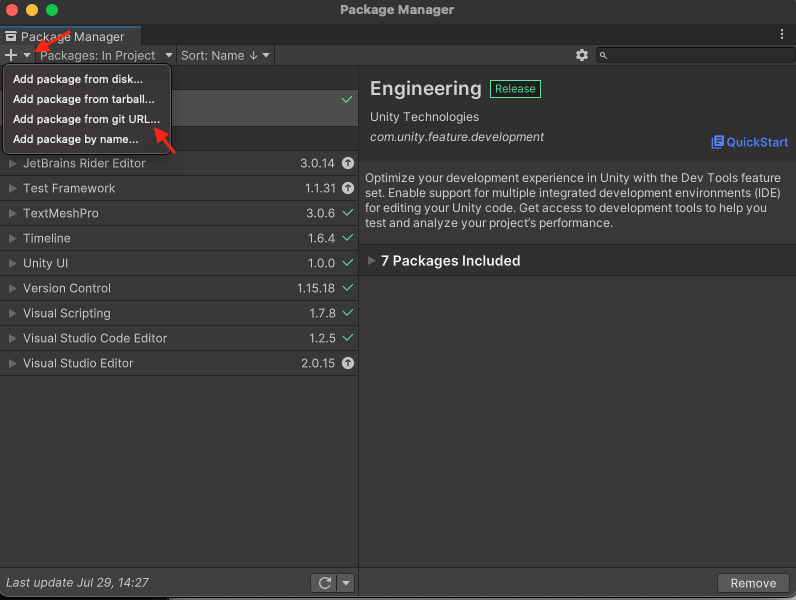 * Enter the `https://github.com/magicblock-labs/Solana.Unity-SDK.git` Git URL in the text box and click Add.
* Once the package is installed, in the Package Manager inspector you will have Samples. Click on Import
* You may also install a specific package version by using the URL with the specified version.
* `https://github.com/magicblock-labs/Solana.Unity-SDK.git#X.Y.X`
* Please note that the version X.Y.Z stated here is to be replaced with the version you would like to get.
* You can find all the available releases [here](https://github.com/magicblock-labs/Solana.Unity-SDK/releases).
* The latest available release version is- [](https://github.com/magicblock-labs/Solana.Unity-SDK/releases/latest)
* Import the Sample Scene
*
* Enter the `https://github.com/magicblock-labs/Solana.Unity-SDK.git` Git URL in the text box and click Add.
* Once the package is installed, in the Package Manager inspector you will have Samples. Click on Import
* You may also install a specific package version by using the URL with the specified version.
* `https://github.com/magicblock-labs/Solana.Unity-SDK.git#X.Y.X`
* Please note that the version X.Y.Z stated here is to be replaced with the version you would like to get.
* You can find all the available releases [here](https://github.com/magicblock-labs/Solana.Unity-SDK/releases).
* The latest available release version is- [](https://github.com/magicblock-labs/Solana.Unity-SDK/releases/latest)
* Import the Sample Scene
* 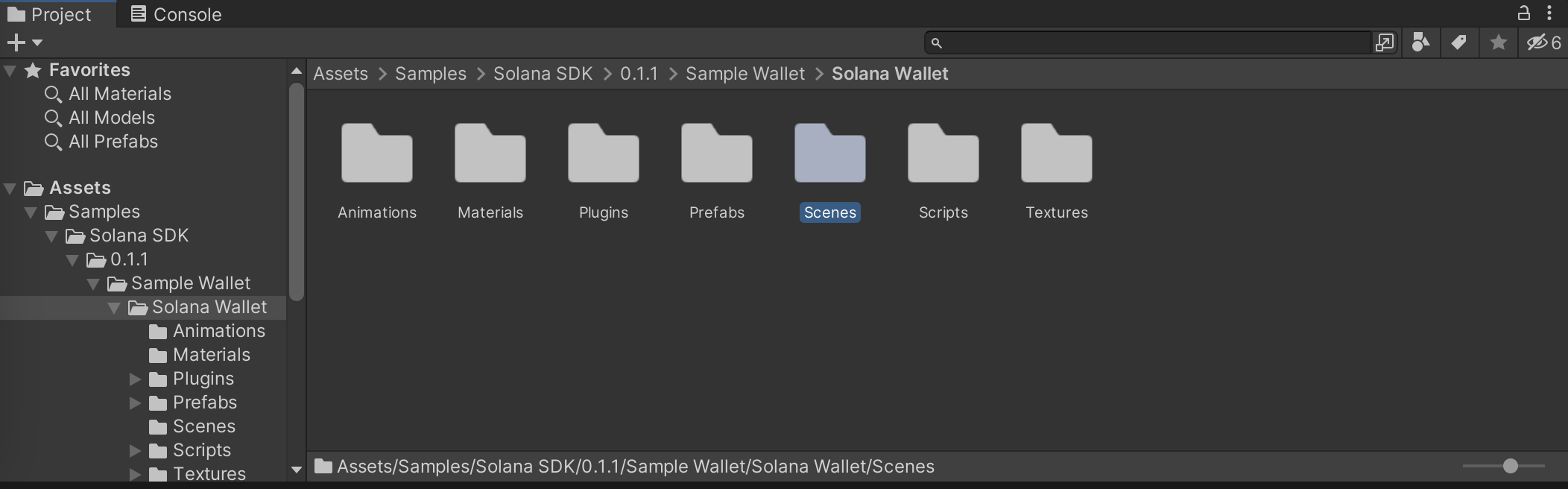 * You will find a sample scene with a configured wallet in `Samples/Solana SDK/0.0.2/Simple Wallet/Solana Wallet/scenes/wallet_scene.unity`
This tutorial is made in Unity 2021.3.5f1
* You will find a sample scene with a configured wallet in `Samples/Solana SDK/0.0.2/Simple Wallet/Solana Wallet/scenes/wallet_scene.unity`
This tutorial is made in Unity 2021.3.5f1