> ## Documentation Index
> Fetch the complete documentation index at: https://docs.magicblock.gg/llms.txt
> Use this file to discover all available pages before exploring further.
# Technical Details
> How Solana VRF integrates with MagicBlock
Random numbers are generated via a VRF built on Curve25519's Ristretto group and proven using a Schnorr-like signature as described in [RFC 9381](https://datatracker.ietf.org/doc/html/rfc9381). The proof and output are returned to the rollup with a signed callback from the MagicBlock VRF signer PDA. Your program verifies the caller and then uses the randomness in gameplay logic.
Helper utilities like `random_u32`, `random_u8_with_range`, and `random_bool` make it simple to convert the `[u8; 32]` output into usable values. Because the request and consume steps occur inside the ephemeral execution window, users get real-time results with verifiable fairness and without relying on external servers.
## Flow
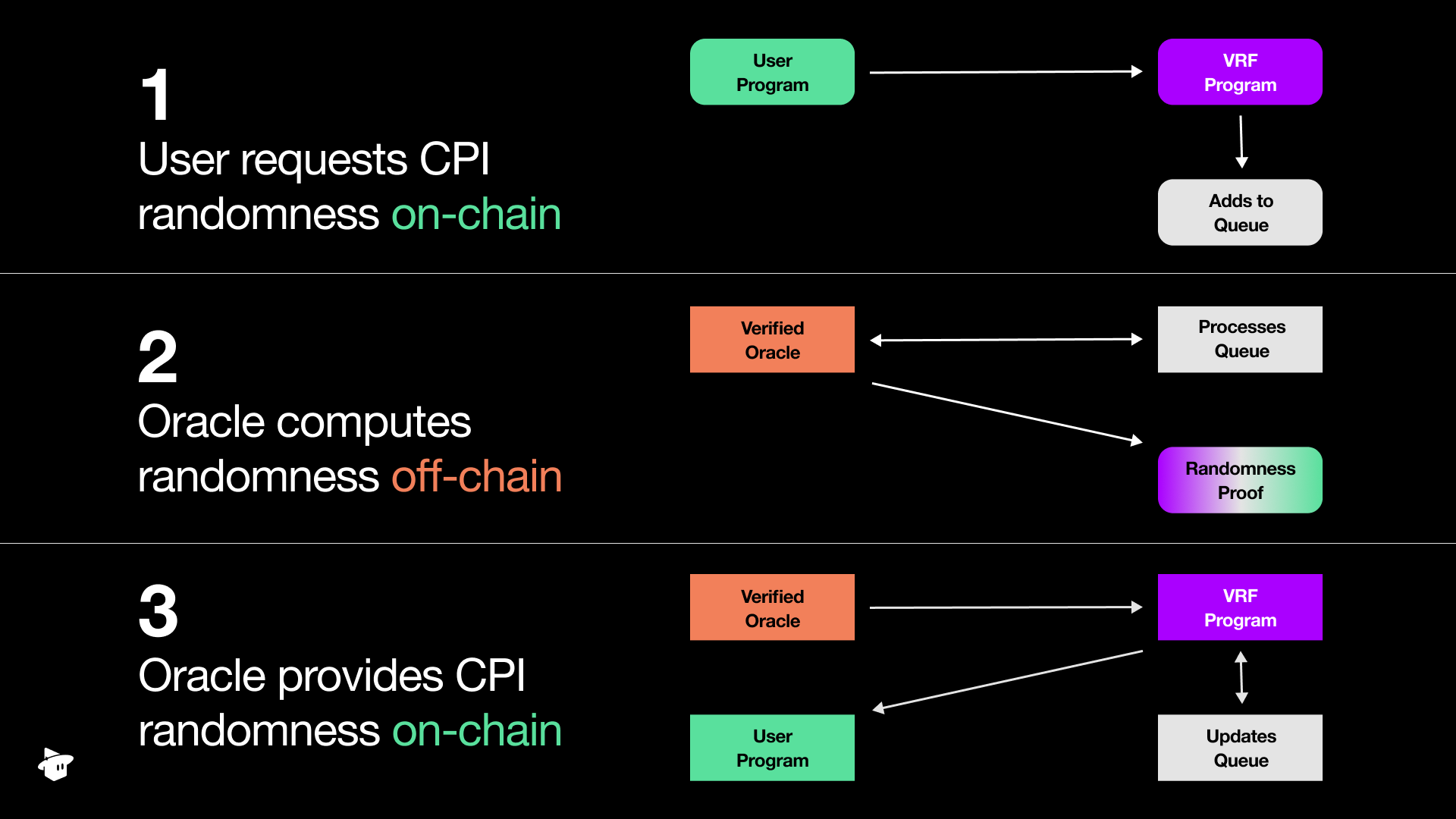 The flow starts with a “Request for randomness”.
1. Your program will CPI into the MagicBlock VRF program and append a request to the queue.
2. Once your randomness request is in the queue, an oracle will release the request and perform the randomness computation.
3. Upon completion, it returns the result and proof to the MagicBlock VRF program. After verifying the proof, the VRF program will callback into your program into a predefined function that will “consume” the randomness.
MagicBlock's VRF Program is open-source and audited. See the Solana VRF overview for the product summary.
## Oracle queues
Every randomness request names an **oracle queue** account (the `oracle_queue` field of `RequestRandomnessParams`). Like every Solana account, the queue lives on Solana — but a **delegated** queue is directly writable only from inside an ephemeral rollup, while a **non-delegated** queue is directly writable on the base layer. Request randomness from the queue that matches where your transaction runs — the base-layer queue from Solana, or the delegated queue from inside the ephemeral rollup. Reference the SDK constants from `ephemeral_vrf_sdk::consts` instead of hardcoding addresses wherever possible.
| Network | Base-layer queue | Delegated queue (ephemeral rollup) |
| -------- | ------------------------------------------------------------------------ | --------------------------------------------------------------------------------- |
| Mainnet | `DEFAULT_QUEUE`
The flow starts with a “Request for randomness”.
1. Your program will CPI into the MagicBlock VRF program and append a request to the queue.
2. Once your randomness request is in the queue, an oracle will release the request and perform the randomness computation.
3. Upon completion, it returns the result and proof to the MagicBlock VRF program. After verifying the proof, the VRF program will callback into your program into a predefined function that will “consume” the randomness.
MagicBlock's VRF Program is open-source and audited. See the Solana VRF overview for the product summary.
## Oracle queues
Every randomness request names an **oracle queue** account (the `oracle_queue` field of `RequestRandomnessParams`). Like every Solana account, the queue lives on Solana — but a **delegated** queue is directly writable only from inside an ephemeral rollup, while a **non-delegated** queue is directly writable on the base layer. Request randomness from the queue that matches where your transaction runs — the base-layer queue from Solana, or the delegated queue from inside the ephemeral rollup. Reference the SDK constants from `ephemeral_vrf_sdk::consts` instead of hardcoding addresses wherever possible.
| Network | Base-layer queue | Delegated queue (ephemeral rollup) |
| -------- | ------------------------------------------------------------------------ | --------------------------------------------------------------------------------- |
| Mainnet | `DEFAULT_QUEUE`
`Cuj97ggrhhidhbu39TijNVqE74xvKJ69gDervRUXAxGh` | `DEFAULT_EPHEMERAL_QUEUE`
`5hBR571xnXppuCPveTrctfTU7tJLSN94nq7kv7FRK5Tc` |
| Devnet | `DEFAULT_QUEUE`
`Cuj97ggrhhidhbu39TijNVqE74xvKJ69gDervRUXAxGh` | `DEFAULT_EPHEMERAL_QUEUE`
`5hBR571xnXppuCPveTrctfTU7tJLSN94nq7kv7FRK5Tc` |
| Localnet | `DEFAULT_TEST_QUEUE`
`GKE6d7iv8kCBrsxr78W3xVdjGLLLJnxsGiuzrsZCGEvb` | `DEFAULT_EPHEMERAL_TEST_QUEUE`
`Sc9MJUngNbQXSXGP3F67KvKwVnhaYn6kcioxXNVowYT` |
Mainnet and Devnet share the same default queue addresses — only the cluster you connect to differs. Localnet uses dedicated **test queues** that the local validator clones from Devnet; the `DEFAULT_TEST_QUEUE` / `DEFAULT_EPHEMERAL_TEST_QUEUE` constants ship with the VRF SDK.
Read the full audit report
Learn how to add randomness capabilities